
Download Data Raccoon – Conversational Stripe Data Analysis Tool
Overview
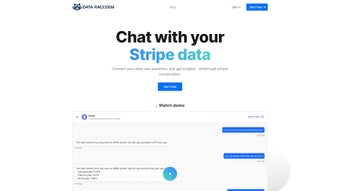
Data Raccoon is an innovative web‑based application built for businesses that rely on Stripe for payment processing. Developed by the AI‑focused team at dataraccoon, the platform turns raw transaction data into conversational insights that anyone can understand—no SQL, no dashboards, no technical jargon required. By simply linking your Stripe account, Data Raccoon lets you ask plain‑English questions such as “What was my revenue last month?” or “Which product category has the highest churn?” and receive instant, accurate answers.
The tool also supports follow‑up queries, allowing you to drill deeper into any metric without leaving the conversation flow. Whether you are a solo founder, a growing e‑commerce shop, or an enterprise finance team, Data Raccoon delivers a secure, user‑friendly way to stay on top of cash flow, customer behavior, and financial health. Upcoming Slack integration promises real‑time alerts and collaborative analysis, while tiered pricing ensures the solution scales with your business needs.
In short, Data Raccoon turns Stripe’s powerful data engine into a conversational assistant that makes financial intelligence accessible to everyone, reducing the time spent on manual reporting and empowering faster decision‑making across the organization.
Core Features and Benefits
- Conversational Queries: Ask natural‑language questions about revenue, refunds, subscription churn, and more.
- Follow‑Up Context: Continue the conversation with additional questions without re‑entering parameters.
- Zero‑Code Analytics: No SQL, no BI tools—just plain English.
- Secure Stripe Integration: OAuth‑based connection keeps credentials safe and data encrypted.
- Real‑Time Updates: Data refreshes automatically as new transactions flow into Stripe.
- Slack Alerts (Upcoming): Receive instant notifications and query results directly in Slack channels.
- Multi‑Tier Pricing: Free starter plan, growth plan for SMEs, and enterprise plan with dedicated support.
- Exportable Insights: Download answers as CSV or PDF for reporting and stakeholder meetings.
- AI‑Powered Accuracy: Uses large‑language‑model reasoning to interpret ambiguous queries and surface the most relevant data.
Why Conversational Analytics Matter
Traditional analytics platforms require a steep learning curve—charts, filters, custom queries. Data Raccoon eliminates that barrier by letting you talk to your data the way you would a colleague. This conversational approach reduces the time from question to answer from hours to seconds, accelerating decision‑making across marketing, finance, and product teams. Because the AI interprets intent, you receive contextualized answers that include relevant timeframes, segment breakdowns, and actionable recommendations. For example, asking “Which cohort is most profitable?” instantly surfaces cohort definitions, revenue contributions, and suggested next steps—no manual cohort building required.
The platform also improves data governance. Every query is logged and can be exported, giving you an audit trail of insights that were used to justify strategic moves. This traceability is especially valuable for regulated industries where financial transparency is a compliance requirement. Additionally, the secure OAuth flow means your Stripe credentials never leave the Stripe environment, and all data transmission is protected with TLS encryption, giving peace of mind to security‑conscious teams.
Installation & Usage Instructions
Getting started with Data Raccoon is deliberately simple. Because it is a web app, there is no software to download or install on your local machine. Follow these steps to unlock conversational analytics in under five minutes:
- Visit the Data Raccoon portal: Navigate to www.dataraccoon.com and click “Start Free Trial.”
- Create an account: Sign up using your work email or single sign‑on (Google, Microsoft). A verification email confirms your identity.
- Connect Stripe: In the dashboard, select “Add Stripe Account.” You’ll be redirected to Stripe’s OAuth flow where you grant read‑only access. No passwords are stored on Data Raccoon’s servers; the connection uses secure tokens.
- Set up your first query: Once linked, a welcome chat window appears. Type a question such as “What was my total revenue this quarter?” The AI will pull the relevant data and display the answer in a friendly card format.
- Use follow‑up questions: Continue the conversation by asking, “Break that down by product category,” or “Show the month‑over‑month growth.” The system retains context, so you never need to restate the original time period.
- Export or share: Each answer card includes icons to download a CSV, generate a PDF report, or copy a shareable link for teammates.
- Upgrade when ready: If you exceed the free tier’s limits (e.g., >1,000 queries per month), click “Upgrade” in the top‑right menu to select a paid plan that matches your usage.
Tips for Power Users
While Data Raccoon is built for non‑technical users, power users can leverage a few advanced features. Use the “Saved Queries” panel to store frequently asked questions and schedule them for automatic delivery via email or Slack (once integration is live). You can also tag queries with custom labels (e.g., “Finance‑Q1”) for easier retrieval. For teams, enable “Collaboration Mode” to let multiple users view and comment on the same conversation thread, fostering a shared understanding of key metrics.
Finally, remember to regularly review the “Data Refresh” timestamp in the settings. Although Data Raccoon syncs in near real‑time, large transaction volumes may introduce a short lag. Adjust the refresh interval if your business experiences high‑frequency payments, and consider enabling notifications for critical thresholds so you never miss a sudden drop in revenue or a spike in refunds.
Compatibility, Pricing & Support
Data Raccoon is a cloud‑native solution, which means it works on any device with a modern web browser—Windows, macOS, Linux, Chrome OS, Android, or iOS. Because the interface is responsive, you can query your Stripe data from a desktop, laptop, tablet, or smartphone without any loss of functionality. There is no need for separate native apps; the web app automatically adapts to screen size and input method.
Pricing Tiers
- Free Starter: Up to 500 queries per month, basic conversational analytics, community forum support.
- Growth Plan – $49/month: 5,000 queries, advanced filters (date ranges, segment filters), CSV/PDF export, email support.
- Enterprise Plan – Custom pricing: Unlimited queries, dedicated account manager, SLA‑backed uptime, on‑premise SSO, priority Slack integration access.
All plans include a 14‑day money‑back guarantee for the paid tiers. Billing is handled securely through Stripe itself, ensuring compliance with PCI standards. Because the service is subscription‑based, you can upgrade, downgrade, or cancel at any time from the account dashboard, giving you full control over costs as your business evolves.
Customer Support & Resources
Data Raccoon offers a comprehensive knowledge base, video tutorials, and a community forum where users share query templates and best practices. Paid subscribers receive priority email support, with response times under 2 hours on business days. The upcoming Slack integration will enable real‑time chat support directly within your collaboration workspace, reducing the friction of switching between tools.
For enterprises, the software includes a Service Level Agreement (SLA) guaranteeing 99.9 % uptime and a dedicated technical liaison to assist with onboarding, custom data pipelines, and security audits. Regular webinars and quarterly product‑roadmap briefings keep large customers informed about new features, ensuring the platform continues to meet evolving analytical needs.
Pros, Cons & Frequently Asked Questions
Pros
- Natural‑language querying eliminates the need for technical expertise.
- Secure OAuth connection to Stripe ensures data privacy.
- Real‑time updates keep insights current as transactions flow.
- Cross‑platform accessibility via any modern browser.
- Scalable pricing fits startups to large enterprises.
- Upcoming Slack integration promises seamless team collaboration.
Cons
- Limited to Stripe data; businesses using multiple payment processors need additional tools.
- Advanced analytics (e.g., predictive modeling) are not yet built‑in.
- Free tier query limit may be restrictive for fast‑growing startups.
FAQ
Is my Stripe data safe with Data Raccoon?
Yes. Data Raccoon uses Stripe’s OAuth protocol, which provides read‑only access via encrypted tokens. No passwords are stored, and all data transmission is protected with TLS 1.2 encryption.
Can I use Data Raccoon on my mobile device?
Absolutely. Because it runs entirely in the browser, the interface is fully responsive on iOS and Android devices, allowing you to ask queries on the go.
What happens if I exceed the query limit on the free plan?
When you reach the limit, the system will pause further queries and prompt you to upgrade. Your existing data remains accessible; you just need to select a paid tier to continue.
Does Data Raccoon support multi‑currency businesses?
Yes. The AI automatically detects and aggregates amounts across all currencies configured in your Stripe account, presenting totals in your primary currency or the one you specify in the query.
When will the Slack integration be available?
The Slack integration is slated for a public beta release in Q4 2025. Early‑access invites are being sent to Growth and Enterprise subscribers.
Final Verdict
Data Raccoon bridges the gap between powerful payment data and everyday business decision‑making. Its conversational AI removes barriers that traditionally kept analytics locked behind technical teams, delivering instant insight to anyone who can phrase a question in plain English. While it currently focuses exclusively on Stripe, the depth of analysis, security posture, and roadmap (including Slack integration) make it a compelling choice for any organization that wants to turn transaction data into actionable intelligence without hiring a data analyst. If you’re already on Stripe and crave a faster, more intuitive way to monitor revenue health, Data Raccoon is well worth a try—especially with a free tier that lets you test the experience before committing.



.png)



